

Logo Lockup Terms: Horizontal vs. Stacked vs. Mono vs. Knockout
Quick Answer
Horizontal and stacked logos are different arrangements of the same identity. Monochrome and knockout are color versions of those arrangements. Ask for the layouts your real placements require, plus approved full-color, one-color, and light versions. Small avatars and app icons may need a separate icon-only mark.
One logo file can look perfectly good on a business card and become useless in a website header. The problem is often the shape of the available space, not the logo itself.
What a lockup is
A logo lockup is an approved composition of the elements in a logo, usually a symbol, wordmark, and sometimes a tagline. Their spacing and proportions are fixed. Use the supplied lockup rather than moving the symbol or resizing one part independently.
Many identities have more than one lockup because a wide website header and a compact sponsor grid ask for different shapes. These are not alternate designs. They are controlled arrangements of the same identity.
Layouts and color treatments are different
Horizontal and stacked describe where the parts sit. Monochrome and knockout describe how the logo is colored. A horizontal lockup can also be monochrome or knockout, as can a stacked lockup.
| Term | What it describes | Typical use |
|---|---|---|
| Horizontal lockup | A wide arrangement, often with the symbol beside the wordmark | Website headers, email signatures, signage |
| Stacked lockup | A compact arrangement, often with the symbol above the wordmark | Sponsor grids, square placements, packaging panels |
| Monochrome version | The approved lockup rendered in one solid color | One-color printing, engraving, embossing |
| Knockout version | Light artwork reversed out of a dark, colored, or photographic background | Dark footers, uniforms, photo overlays |
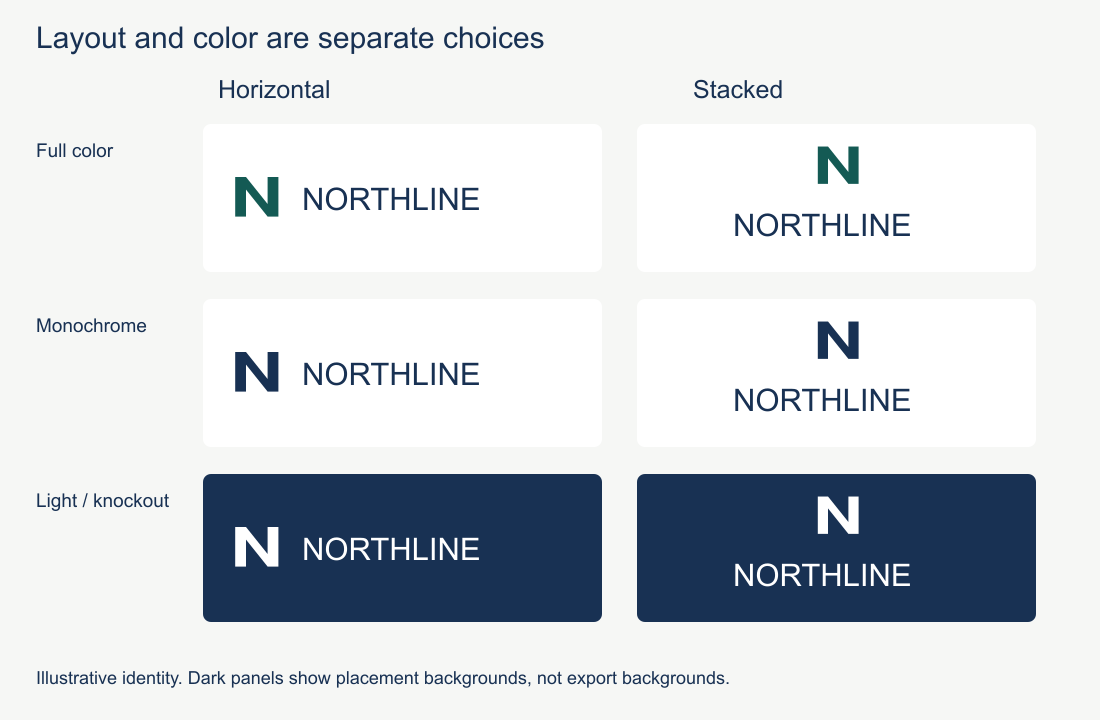
The same illustrative identity appears six times in this original diagram. Read across to choose an arrangement; read down to choose a color treatment. "Stacked" and "white" can describe the same file. The dark panels demonstrate a background placement, not a dark rectangle you should bake into a transparent export.
This distinction matters when requesting files. "Send the stacked logo" describes the arrangement. "Send the white stacked logo" describes both the arrangement and its color treatment.
Choosing between horizontal and stacked
A horizontal lockup usually works best in wide, shallow spaces. A website header is the obvious example: there may be plenty of width beside the navigation, but very little height.
A stacked lockup helps when the available area is closer to square and the company name will still be large enough to read. Sponsor grids and packaging labels often fall into this category. Do not squeeze a horizontal lockup into the space or rearrange it yourself. Use the approved compact version.
Neither layout is automatically the primary logo. A long company name may strongly favor a horizontal arrangement. A badge-style identity may work best as a compact mark from the start. Choose the primary version around the placements the business uses most.
Monochrome and knockout versions
A monochrome logo uses one ink or one digital color. It is useful when the production method cannot reproduce the full palette, as with engraving, embossing, stamps, or some inexpensive print jobs.
A knockout logo is designed to sit over a darker surface. It is commonly white, but it can use another approved light color. The file itself may have a transparent background; "knockout" describes how the artwork appears against the surface, not a dark rectangle built into the file. Over a photograph, place it on an area with steady contrast rather than a bright or visually busy patch.
For steps to prepare and test these treatments, use the light, dark, and transparent variations guide. The terms here tell you which file you are asking for; they do not make an untested recoloring an approved version.
Small spaces may need a separate mark
A stacked lockup is not the same thing as an app icon or favicon. At small sizes, even a compact wordmark may become unreadable. Combination logos often include an icon-only mark for social avatars, browser favicons, and other tight placements.
Designers may call this file a brandmark or icon-only mark. "Signature" is also used in some identity systems, but it can mean a full symbol-and-wordmark combination elsewhere. Check the actual artwork rather than relying on the filename.
An icon-only logo is source artwork, not a finished app icon. It still needs platform-specific sizing, padding, backgrounds, and crop testing. Circular social crops need the same attention. For browser-specific guidance, see how to turn a logo into a favicon.
Wordmark-only identities work differently. They may not have a separate symbol, and many do not need a stacked arrangement. Some use a compact or multiline wordmark for tight spaces, while others rely on initials or a purpose-built secondary mark. The wordmark, lettermark, and pictorial logo guide explains those categories.
Clear space is specific to the logo
Clear space is the minimum empty area around a logo. It keeps text, images, borders, and other marks from crowding it.
There is no universal measurement. One identity might define clear space as the cap height of a letter. Another might use half the width of its symbol. The correct unit should appear in the brand guidelines and scale with the logo.
If no rule exists, start with enough room for the logo to read as a separate element, then test it in the real layout. A 48px-tall logo does not automatically need 48px of padding on every side.
What to ask for in a brand kit
The useful set depends on the identity and where it will appear. For a combination logo, a practical handoff often includes:
- The approved primary lockup and any horizontal or stacked alternatives
- Full-color, monochrome, and knockout versions of the arrangements you will use
- An icon-only mark, when the identity has one
- SVG files in RGB for websites and digital products
- Print-ready PDF files in CMYK, plus spot-color versions when the printer requires them
- Transparent PNG files at pixel sizes that match common everyday uses
- Minimum-size and clear-space guidance
- Clear filenames that identify the layout, color treatment, and RGB or CMYK version
Read a filename as separate choices
A useful name such as northline-horizontal-mono-rgb.svg identifies the arrangement, color treatment, color specification, and format. Those choices answer different questions. "Mono" does not tell you whether the artwork is stacked, and ".svg" does not tell you whether it is the approved light version.
For the illustrative identity in the diagram, a request might be:
Please send the approved horizontal light logo for our dark website footer, as SVG and a transparent PNG at twice the displayed width. Keep the supplied spacing and proportions.
That is more precise than "send the white logo." If the printer asks for a stacked one-color PDF, confirm the required ink and production settings rather than forwarding the website file with a new extension.
The PNG versus SVG guide explains formats and export dimensions. The brand kit handoff guide covers organizing the approved files, and the brand guidelines generator can help document their usage rules.
Frequently asked questions
- What's the difference between a horizontal and a stacked logo?
- They're two arrangements of the same identity. Horizontal sets the elements in a row for wide spaces like website headers, while stacked centers them for square or narrow spaces. Choose the arrangements your real placements need; a wordmark-only identity may not need both.
- What are monochrome and knockout logo versions for?
- Monochrome is a one-color version for single-color printing or low- contrast backgrounds. Knockout is a reversed version that drops out to white on dark backgrounds. Both are color treatments of your existing layouts, not separate logos.
- Which logo lockups should I ask for in a brand kit?
- Ask for the layouts your real placements need and the approved color treatments those placements require. For small crops, test a compact wordmark, lettermark, or icon rather than requesting every variant by default.
- Do I need a separate icon if I already have a full logo?
- Not necessarily. A short wordmark or lettermark may fit. If the full arrangement becomes unreadable, test a compact alternative at the actual size and crop before deciding that a separate symbol is needed.
Ready to create your logo?
Generate a professional SVG + PNG logo in under 30 seconds.


