
What Font Should I Use for My Logo? A Non-Designer's Guide
Quick Answer
Choose a logo font by testing your actual business name, rather than assuming an industry requires a particular category. Compare a serif and a sans-serif, then adjust weight and spacing. Check the name at header and print sizes; use a separate symbol or initials if it cannot fit a favicon. Script and display fonts can add character, but their details need the same legibility check.
The font in your logo does a lot of work most people don't consciously notice. Put a law firm's name in a casual brush script and it immediately feels off, even if you can't say why. That's typography doing its job quietly — setting expectations before anyone reads a word. A law firm and a kids' toy brand could share the same name and the same icon; change the font and they feel like different businesses entirely. The font matters most when the name carries the logo, so the logo type guide — wordmark, lettermark, or combination — is worth reading alongside this one.
The four font categories
Serif fonts
Serif fonts have small finishing strokes at the ends of letterforms. They're the oldest typeface category and carry centuries of association with print, publishing, and authority. Think Times New Roman, Georgia, Garamond, Playfair Display, Merriweather.
Serifs can suggest a connection with print or tradition, but that impression depends on the font, layout, and audience. Tiffany & Co., The New York Times, Vogue, Harvard: all serifs.
The practical caveat: very thin serifs disappear at small sizes. If your logo needs to work on a favicon or embroidered badge, test it at 16px before committing.
Sans-serif fonts
Sans-serif fonts have no finishing strokes. Clean letterforms, nothing extra. They've dominated digital design for decades and many have sturdy shapes that work well on screens, although weight, spacing, and size still affect readability. Helvetica, Futura, Inter, Montserrat, Open Sans are the common ones.
They read as modern and approachable. Google, Airbnb, Spotify, and LinkedIn all use them.
The catch: generic sans-serifs are everywhere. A common free font with no customization means your logo looks like thousands of others. Letter spacing and weight selection matter enormously here.
Script fonts
Script fonts mimic handwriting or calligraphy, from formal copperplate to casual brush lettering. They suggest elegance and personality, which makes them a natural fit for beauty brands, bakeries, wedding businesses, and personal brands.
Script is also the most misused category. Casual scripts feel cheap quickly. Formal scripts need generous spacing to read well. And many scripts are completely illegible at small sizes. If someone can't read your business name at a glance, the font is wrong regardless of how it looks at full size.
Display fonts
Display fonts are designed for impact at large sizes: expressive, often unusual, built for a single statement. Bebas Neue, Oswald, Supreme's box logo: these work in entertainment, gaming, streetwear, and food brands with a strong personality.
A highly fashionable display font can tie a logo to a particular period. A font that felt edgy a few years ago can now pin you to a specific era you don't want to be associated with. Some lose detail at small sizes or feel too loud for a restrained design. Test the particular font rather than ruling out the whole category.
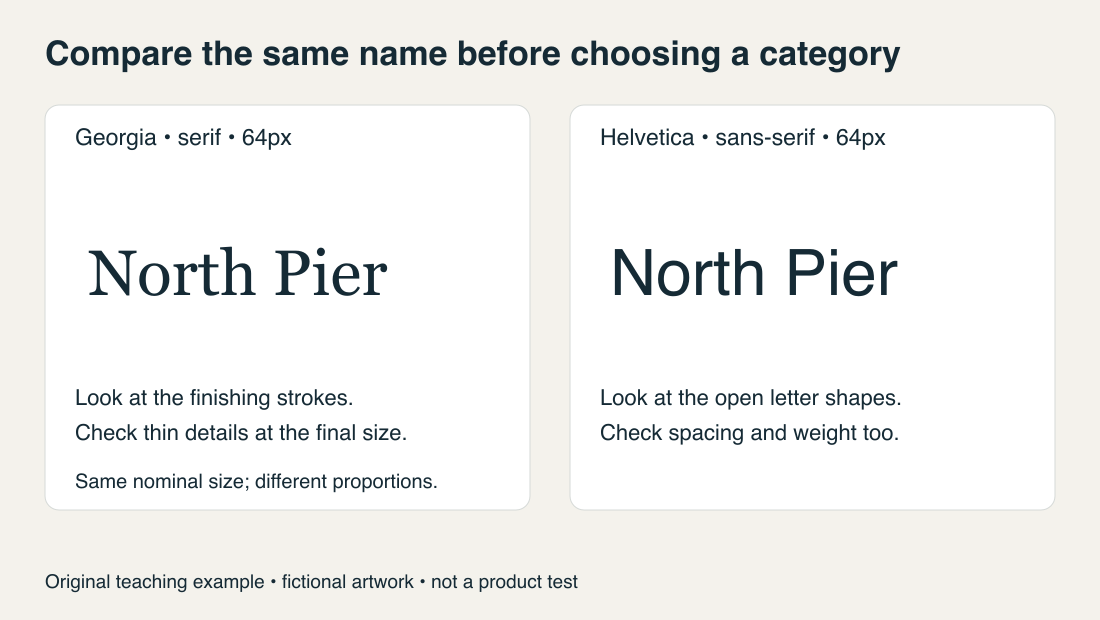
This fictional wordmark uses Georgia and Helvetica at the same nominal size and regular weight. Their different widths and shapes are visible without assigning either font a universal personality. Try your own name the same way, then inspect it at its intended output size.
How to choose
Start by writing down a couple of adjectives that describe your brand. Not "professional" — that's too vague to filter anything. Try something like "precise," "warm," or "authoritative." Once you have those words, use them as a filter: does this typeface feel like them?
From there, cut the obvious mismatches. A law firm probably shouldn't use casual scripts or loud display fonts. A consumer app probably doesn't need a formal serif. A bakery going for handcrafted warmth will likely feel cold in a geometric sans-serif.
One thing most people overlook: weight changes the personality as much as the typeface itself. A light sans-serif feels minimal and premium. The same font in black weight feels assertive and heavy. Lock in your weight preference before getting attached to a specific face.
Then test at real sizes. Your logo needs to work on a full-size website header, a business card, a favicon, and in embroidery or screen print. A font that looks perfect at 120pt on screen may be illegible as a favicon.
Font starting points by industry
| Industry | Recommended direction | Example fonts |
|---|---|---|
| Legal / Finance | Serif, medium-to-bold weight | Playfair Display, Libre Baskerville |
| Technology / SaaS | Geometric sans-serif | Inter, Montserrat, Raleway |
| Health / Wellness | Humanist sans-serif | Lato, Nunito, Source Sans Pro |
| Food / Café | Script or rounded sans | Pacifico, Quicksand, Josefin Sans |
| Beauty / Cosmetics | Thin serif or elegant script | Cormorant Garamond, Great Vibes |
| Creative Agency | Display or custom sans | Bebas Neue, Oswald, Barlow Condensed |
| Retail / E-commerce | Clean sans-serif | Poppins, DM Sans, Outfit |
| Personal Brand | Depends on personality | Match to the three-word exercise above |
Treat these as starting points rather than rules for an industry. Check each font's license and the actual weights you will use at Google Fonts. When you settle on one, record the name and weights with the rest of the kit; the brand kit handoff guide covers the fonts.md a developer expects.
Legibility first
If you're torn between a font you love and one that reads clearly at small sizes, pick legibility. A beautiful font that turns into a blur at favicon size has failed at the one thing a logo has to do: make your name stick.
Personality can come from color — your brand palette carries a lot of it — plus spacing and the icon. It doesn't have to come from the font.
Start a logo on the Brandize home page and it pairs a font with the mark automatically. The brand board generator then shows that type in context alongside the colors, so you can judge the pairing rather than the font alone.
Ready to create your logo?
Generate a professional SVG + PNG logo in under 30 seconds.


